Meet plant markers — tap your design to know every plant
Every plant in a finished design now gets its own labeled pin on the photo — spotlight one species with a tap, keep markers through every edit, and let anyone you share with explore them too.

YardRemake Studio
Published August 6, 2026 · 3 min read · 5 sections
On this page
A finished design has always come with a real plant list — names, zones, care needs, links to every plant’s page. But the list lived next to the photo, and the photo kept its secrets: okay, the design includes astilbe… which one is the astilbe?
Now the photo answers. Meet plant markers.
Every plant, pinned
Open any finished design and tap 📍 Plant markers. Every plant gets its own pin — a color-coded dot on the plant itself, with a name tag floating above it. Same species, multiple spots? Each one is numbered (“Hosta 1/2”, “Hosta 2/2”), so nothing blurs together even in a packed bed.
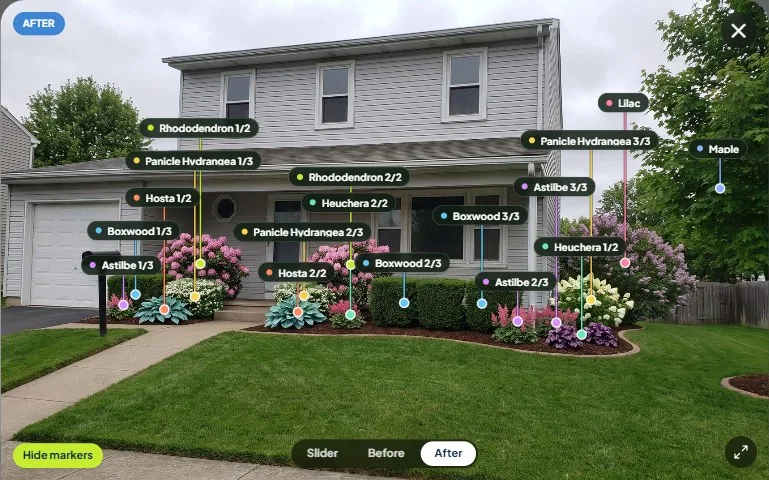
Markers work everywhere your designs live: the result screen right after generating, any saved design in your library, and the fullscreen view when you want a closer look. Each plant card shows a 📍 count, too — so you always know how many of that hydrangea made it into the yard.
Spotlight one species
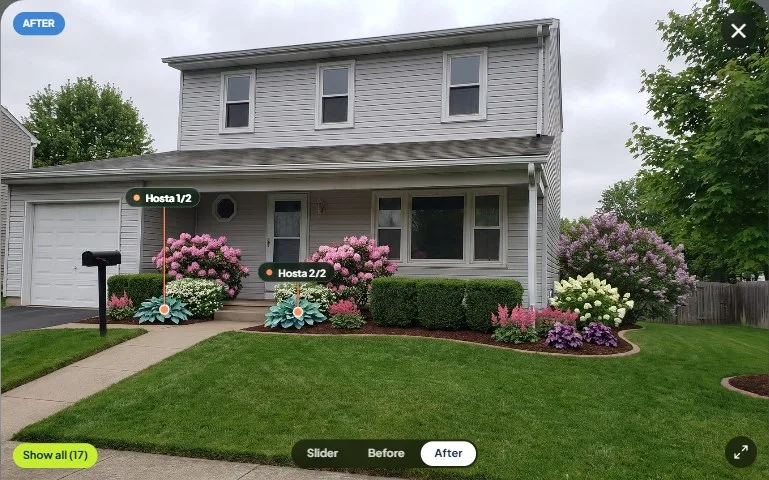
Seventeen pins is a lot of pins. So markers are built for the question you’re actually asking, which is almost never “label everything” — it’s “where are the hostas?”
Tap any plant’s card — or tap a name tag right on the photo — and every other marker steps aside. Just that species stays, with a little pulse so you can’t miss it. Tap again and the full set returns.
Swap exactly the plant you mean
Plant swapping shipped in July, and markers make it precise. Because the design knows each individual plant, you can now swap one specific plant instead of all of them — keep two of the three boxwoods and replace just the one by the steps. Pick a plant to swap, choose which one from its numbered markers, and everything else stays put.
Markers survive every edit
Designs keep a full version history — the original render plus every swap and tweak. Markers now travel with each version: flip to any render in the switcher and its own markers light up, matched to exactly what’s in that image. Edit five times, and all six versions still know their plants.
Shared designs come with markers too
This might be our favorite part. When you share a design, the person opening your link gets the same 📍 toggle you have — they can light up every pin, tap a tag to spotlight a species, and click through to each plant’s care page.
Send a design to your partner, your HOA, or your landscaper, and the conversation skips straight past “what’s the purple one on the right?” — the photo introduces every plant itself.
Plant markers are live now on every new design. Reimagine your yard and watch it introduce you to its plants.